Posts

Showing posts with the label Teradata

5 Top Teradata DATE functions to read now

Image
Top list of DATE functions. These functions frequently used in Teradata. The following statement requests the current system date:

Teradata Quick refresher for most popular Utilities

Image
Teradata utilities are very important while working with SQL and in data warehousing projects. The below short and crispy definitions help you can use while attending for interviews or in your day to day work to refresh your Teradata knowledge.  Top Teradata Utilities 1# MultiLoad  Inserts, updates, deletes, or upserts rows in a Teradata table by using the MLOAD command-line utility. It can handle multiple SQL statements in a single operation. You can provide user-defined SQL for complex operations. This stage is best used for bulk updates, deletes, upserts, and complex interface operations. 2# TPump  Inserts, updates, deletes, or upserts rows in a Teradata table using the TPUMP command-line utility. It can do concurrent updates on the same table. It can handle multiple SQL statements in a single operation. You can provide user-defined SQL for complex operations. 3# FastExport  Exports data from a Teradata table by using the FEXP command-line utility. ...

All You Need NULL Value Functions

Image
The below are the Null value functions in Tearadata. One is "NVL" and another one is "NVL2". These two functions are part of Teradata SQL . NVL -The NVL function replace null value with a string or numeric value. This is the functionality is same as Teradata function NULLIF. It requires two arguments. If the value is not null, it will not do anything. The best SQL Null functions  NVL function:  SELECT NVL (NULL,'USA'), NVL('SPAIN','USA'); ----------- USA SPAIN Also Read: Top 70 Teradata Interview Questions The NVL2 function : Returns one of two specified values (arguments#2 and Arguments#3) based on weather the first arguments in NULL or not. It requires three arguments. The rule is as follows: If expression 1 is not null, expression 2 is returned If expression 1 is null, expression 3 is returned The best NVL2 example SELECT NVL2(NULL,'FRANCE','SPAIN'), NVL2('ENGLAND','FRANCE','SPAIN...

How to Know Teradata is in Pseudo table Lock

The pseudo table mechanism is a way to serially queue all table level locks through the use of an internal pseudo table. In this table the database locks the row hash of the table's table ID.

How Teradata determines primary index

Image
Every table must have at least one column as the Primary Index. The Primary Index is defined when the table is created.There are two reasons you might pick a different Primary Index then your Primary Key. They are (1) for Performance reasons and (2) known access paths. Primary Index Rules  Rule 1: One Primary Index per table. Rule 2: A Primary Index value can be unique or non-unique. Rule 3: The Primary Index value can be NULL. Rule 4: The Primary Index value can be modified. Rule 5: The Primary Index of a populated table cannot be modified. Rule 6: A Primary Index has a limit of 64 columns. Two Types of Primary Indexes (UPI or NUPI)  Unique Primary Index(UPI) - A Unique Primary Index (UPI) is unique and cannot have any duplicates. If you try and insert a row with a Primary Index value that is already in the table, the row will be rejected. An UPI enforces UNIQUENESS for a column Non-Unique Primary Index (NUPI) - A Non-Unique Primary Index (NUPI) means that the v...

34 Complex Teradata Architecture Questions

Image
Teradata Architectural Questions  QUESTION No:1 An administrator is trying to manage resources on the system because there is a business critical reporting requirement. The reporting workload starts at 9AM and is required to finish by 10AM. At the same time, ad hoc users are allowed to access the system. The administrator is building a Query Resource Throttle in TDWM to better manage the resources. Which two are available as options for building the throttle? (Choose two.) A. Index Scan Types Allowed B. Throttle All-AMP Queries Only C. No Aggregate Functions Allowed D. Only limit queries with Step Time Threshold Answer: C,D QUESTION NO: 2 An administrator is asked to keep a daily backup of a very large transaction table. The table is defined with a PPI with a daily partitioning expression on insert date and the table is insert only. There is not enough of a window to backup the entire table each night. In this situation, which backup strategy is the best approach? A. Implemen...

How best You can use Teradata data mover

Image
Top advantages of Teradata data mover in data warehousing projects. An End-to-End Management Solution. Before going in detail you can refresh All You Need to Know About Teradata Architecture . You can also integrate data movement within your comprehensive ecosystem management and load jobs and automate.  Teradata Data Mover for your production execution needs.  That’s because the utility can be tightly integrated with Teradata Multi-System Manager for end-to-end management of changes to your environment.  The utility works with Teradata Multi System Manager to support these commands and status messages: Send event for the start of a job.  Send event for end of a job.  Send event for a job in progress.  And Teradata Data Mover can be integrated with load process to copy data to a second system.That means you can copy data from an EDW to a data mart as soon as the data are loaded into the EDW.  Teradata Data Mover also provides safeguard...

Top features of Teradata data mover for large data transfer

Image
Teradata Data Mover Moving data from one system to another is a key part of your analytical ecosystem operation. Well-planed, monitored, and managed data movement is essential to effective operation of your overall ecosystem. Whether your goal is to complete a onetime copy of data from your enterprise data warehouse (EDW) to your test system or to regularly and continuously synchronize a dual system environment, you need confidence that the data will be in the right place at the right time while causing the smallest possible impact on the data warehouse’s mission of serving your business. The decision about the best way to copy data between Teradata systems depends on many factors, including the data model and indexes present, other workloads in your system, and additional load jobs underway. What you need is a solution that automates the data movement process, a solution that also accommodates the many situations found within your comprehensive analytical ecosystem. And th...

Teradata Architecture: What are Similarities between User and Database

Image
Differences between Database and USER: A Database or a User can be assigned PERM Space If the Database Store is assigned 10 GB of PERM, that means it can hold up to 10 GB of Permanent Tables.  If the User Nancy is assigned 10 GB of PERM, that means she can hold up to 10 GB of Permanent Tables. A Database or a User can be assigned Spool Space If the Database Store is assigned 10 GB of Spool, that means all users under Store can each run 10 GB queries. If the User Nancy is assigned 10 GB of Spool, that means she can run up to 10 GB queries, and any user created under Nancy will default to 10 GB queries. In Teradata, the only difference between a database and a user is that a user can login and run queries. Roles and Teradata Access rights: Roles simplify database administration by assigning access rights to tables and other objects, and then groups of people with similar job functions (or roles) can access these objects. It is as simple as creating different roles...

Top Teradata Interview Questions and Answers (1 of 7)

1. Difference between Teradata and Other RDBMS? The following advantages Teradata  is having over other RDBMS: - Parallel processing - Shared nothing architecture - Super fast data retrieval - TASM-Teradata active control system controls traffic efficiently - Teradata VIEWPOINT gives DBA and users their own view of data - Excellent data processing options-JOINS, Secondary Indexes, Hash index, Portioned Tables for range queries, 2. Draw the picture of Teradata warehouse? Refer the diagram 3. What are the differences between Star schema and Snow flake schema? Star Schema: In a star schema every dimension will have a primary key. In a star schema, a dimension table will not have any parent table. Whereas in a snowflake schema, a dimension table will have one or more parent tables. Hierarchies for the dimensions are stored in the dimensional table itself in star schema. Whereas hierarchies are broken into separate tables in snowflake schema. These hierarch...

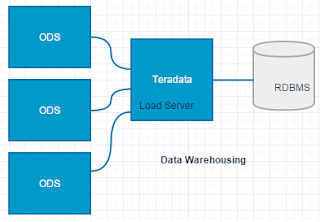
DW: Teradata Data warehousing Pictorial Diagram

Image
ODS : Operational data source Teradata Load Server:  Where data received from ODS is stored in Teradata load server. RDBMS: This is the database, which interacts with Tearadata Load server.

3 Uses of SAMPLE function in Teradata

Image
Usage-1 It returns a rows randomly from Teradata database. Syntax for SAMPLE function: SAMPLE [WITH REPLACEMENT]    [RANDOMIZED ALLOCATION]                  [WHEN <condition>  THEN]                  {<number-of-rows> | <percentage>}    […,<number-of-rows> | <percentage>]                  [ELSE {<number-of-rows> |    <percentage }   END] Usage 2 It allows the user to get absolute number of rows or percentage of rows. Usage 3 It also allows the rows to get from multiple samples How to get random rows from a table: SELECT * from sample_table SAMPLE 5; How to get certain percentage of rows: SELECT * from sample_table SAMPLE .30; How to get multiple SAMPLE data from a single tables with out duplicates: SELECT * from sample_...

SQL Query to Create a View in Teradata

Image
Simple SQL query to create a view in Teradata: CREATE View Employee_V AS SELECT      Employee_No            ,First_Name            ,Last_Name            ,Dept_No FROM Employee_Table ; - A view we create to restrict access to certain columns -To restrict access to certain derived columns -To restrict access to join tables -To restrict access to certain rows View is basically in a semantic layer. It supports to Presentation layer. Some time a view can change column names, a view can derive new columns , also aggregate columns. Simple rules for views: - A view should not contain Order By -All aggregate columns must have ALIAS -All derived column must have ALIAS

Real Rules to Qualify as Teradata Index

Image
Indexing is one of the most important features of the Teradata RDBMS. In the Teradata RDBMS, an index is used to define row uniqueness and retrieve data rows, it also can be used to enforce the primary key and unique constraints for a table. The Teradata RDBMS support five types of indexes Unique Primary Index (UPI)  Unique Secondary Index (USI)  Non-Unique Primary Index (NUPI)  Non-Unique Secondary Index (NUPI)  Join Index  The typical index contains two fields: a value and a pointer to instances of that value in a data table. Because the Teradata RDBMS uses hashing to distribute rows across the AMPs, the value is condensed into an entity called a row hash, which is used as the pointer. The row hash is not the value, but a mathematically transformed address. The Teradata RDBMS uses this transformed address as a retrieval index. The following rules apply to the indexes used in the Teradata Relation database: An index is a scheme used to...

3 Types of Access Rights in Teradata

Image
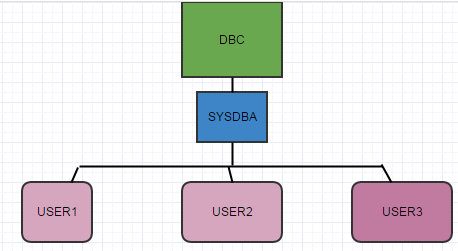
There are 3 types of access rights in Teradata. How these access rights will obtain? Let us see full details. DBC is default user, under it SYSDBA will come, and then other users will come. DBC is super user, it has full powers, and credentials should be Confidential. Implicit rights : Belong to the owners of objects. Owners don't require rows in the DBC.AccessRights table to grant privileges on owned objects. Ownership rights can't be revoked. A parent or owner has the implied right to GRANT privileges over their children. DBC and SysDBA hold implicit roles on all the other databases above. Automatic rights: Happen whenever a CREATE statement is submitted, and new rows are automatically added to the DBC.AccessRights table. When the databases above were created, they automatically received all but four access rights on themselves. Automatic rights are removed with REVOKE or DROP statements. Explicit rights  : are completely controlled by when a user explicitly and ...

3 Types of Teradata Temporal Tables

Image
There are 3 types of Temporal Tables. 1. Valid time temporal tables 2. Transaction time tables 3. Bi-Temporal tables How to create Bi-temporal Tables: CREATE MULTISET TABLE Asset_Owners ( Cust_No        INTEGER  ,Asset_No        INTEGER  ,Asset_Val_Time   PERIOD (DATE) NOT NULL as VALIDTIME  ,Asset_Tran_Time PERIOD (TIMESTAMP(6) with TIME ZONE)                       NOT NULL as TRANSACTIONTIME )PRIMARY INDEX(Prop_No) ; Why we call this as Bi-temporal table  means,we aliased one column as VALIDTIME and another column as TIME ZONE. "PERIOD" is a new data-type, So it refers begin date and end date: 2015-01-01.2015-01-30 For time, 2015-01-01 08.09.000000-05.00.9999-12-31 08.09+05.30 So we understand that how data will be stored in PERIOD data type. Keep reading more on Temporal tables.

What is columnar table in Teradata best example

Image
#What is columnar table in Teradata best example: What is columnar table in Teradata? Let me give an example. Create table samples.test_1(name varchar (10), id integer ) no primary index; This table we also call it as NOPI table. Two rules for columnar table. Table must be multiset table It should be NOPI table Additional Points on columnar tables: Columnar Tables allow Columns to be Partitioned. An AMP still holds the entire row, but partitions vertically. Columns are placed inside their own individual Container.

Hash Functions in Teradata

Image
There are four hash functions in Teradata.These are pre-defined functions in Teradata. HASHROW Returns the hexadecimal row hash value for an expression or sequence of expressions. If no expression is specified, HASHROW returns the maximum hash code value. HASHBUCKET  Hashmap defines the correspondance between Hashbucket and AMP. The size of Hashbucket is corresponds to the number of busckets available in the system. HASHBAKAMP Returns the identification number of the fallback AMP corresponding to the specified hash bucket. If no hash bucket is specified, HASHBAKAMP returns one less than the maximum number of AMPs in the system. HASHAMP Returns the identification number of the primary AMP corresponding to the specified hash bucket number. If no hash bucket number is specified, HASHAMP returns one less than the maximum number of AMPs in the system. Also read More on Hash Functions

Teradata Data Dictionary-Frequently Used SQL (1 of 2)

Image
DBC is superuser in Teradata. Very often we need to know some information from Data dictionary tables of Teradata. Frequently used Tables are as follows. We have only Select DML access on data dictionary tables. 1. DBC.User Describes in detail all information about users that the requesting user controls, including passwords. User type: • End User • Teradata Database Administrator • Supervisory 2. DBC.Sessioninfo Gives one row for each time the user is logged on; used as a review of accounts set by user. User type: • Teradata Database Administrator • Supervisory • Teradata Database Security Administrator • [X]End User Select * from DBC.SessioninfoX ==> Will give information about only that user.

Teradata Unique Architecture

Image
#Teradata Unique Architecture: The main cmponents of Teradata are PE, BYNET and AMP PE - Also called Parsing Engine. It is called OPTIMIZER. BYNET- It is the communication channel between PE and AMP AMP - Is called Access Module Processor. It acts like processor in its own disk. AMP to AMP we can not share the data. So it is called "SHARED NOTHING ARCHITECTURE".